
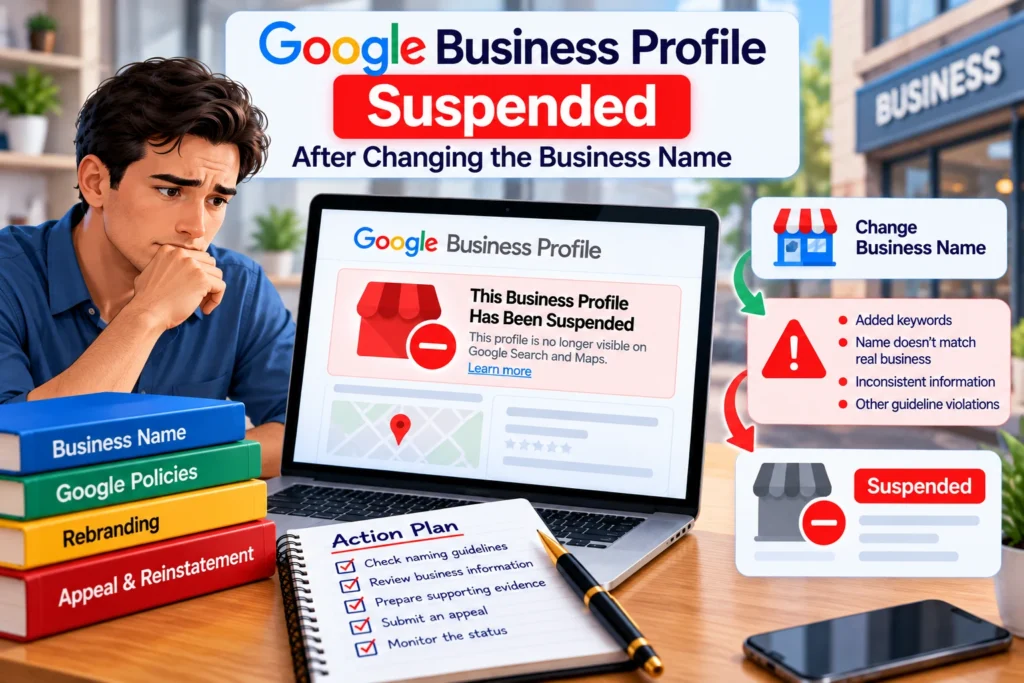
Changing your business name on Google Business Profile should reflect a genuine change in how your business operates and presents itself to customers. However, if your profile becomes suspended shortly after you update the name, you may be left wondering whether the edit triggered a policy review, whether the new name violates Google’s guidelines, or what you need to do to get your profile reinstated.
A Google Business Profile suspended after changing the business name does not automatically mean that the name change itself was prohibited. The timing is an important clue, but it does not prove the exact cause of the suspension. The change may have exposed a mismatch between your profile and your real-world business identity, or Google may have identified another issue that requires attention.
The safest approach is to review the name change carefully, check the information associated with your profile, collect relevant evidence, and follow Google’s official reinstatement process. Avoid making repeated edits or creating another profile while trying to resolve the suspension.
This guide explains why a Google Business Profile may be suspended after a business name change, how to identify potential problems, what evidence to prepare, and how to approach the reinstatement process.
Why Was My Google Business Profile Suspended After a Name Change?
Google requires a Business Profile to represent a real business accurately. Its business name guidelines state that the name should match the name used consistently in the real world, including on storefront signage, stationery, and other business branding.
When you change the name displayed on your profile, the updated information may no longer match the evidence associated with the business. A name change can also draw attention to other inconsistencies in the profile.
Several scenarios may explain why your profile was suspended after the change.
1. The New Business Name Includes Extra Keywords
One common problem is adding search terms or promotional phrases to a business name.
For example, suppose a business previously used the name:
Brightway Plumbing
After an edit, the profile displays:
Brightway Plumbing – Best Emergency Plumber in Dallas
If the additional wording is not genuinely part of the business’s real-world name, it may violate Google’s business name guidelines. Descriptive phrases, service lists, marketing slogans, locations, and other keywords should not be added simply to influence search visibility.
Google provides separate fields for information such as business categories, services, addresses, service areas, and opening hours. These details should be entered in their appropriate fields rather than added to the business name.
If you added keywords when changing your name, review the displayed name against your actual business identity before proceeding with an appeal.
2. The Name on the Profile Does Not Match Your Real-World Branding
A legitimate business name change can still create questions if the updated name is not consistently reflected across your business materials.
For example, your profile may display a new company name while the following still show the previous name:
- Permanent storefront signage.
- Business registration or licensing documents.
- Invoices and other official business records.
- Your business website and contact information.
- Other materials customers use to identify your business.
A mismatch does not automatically prove a violation. Businesses can legitimately rebrand, and different documents may be updated at different times. However, unexplained inconsistencies can make it more difficult to demonstrate that the profile accurately represents the business.
If the business has genuinely rebranded, prepare evidence that explains the transition rather than assuming that every document must already display the new name.
3. The Business Name Change Was Not a Genuine Rebrand
Changing a business name solely to target additional search terms can create problems.
For example, a company that operates under one established name might change its profile to include several services or geographic keywords without changing its real-world branding.
This is different from a genuine business name change caused by a rebrand, acquisition, ownership transition, or another legitimate business development.
Before appealing, ask yourself:
- Is the new name actually used by the business?
- Would customers recognize the business by this name?
- Does the new name appear on relevant business materials?
- Does the name accurately represent the same business?
- Have any unrelated changes been made at the same time?
Your answers can help identify whether the name itself needs to be corrected before you submit an appeal.
4. The Business Name Change Coincided With Other Profile Changes
Sometimes the name change is only one part of a larger set of edits.
For example, you may have updated the business name, primary category, address, website, phone number, or service area within a short period.
These changes do not automatically violate Google’s policies. However, when several details change together, it can become harder to identify which information needs correction or what evidence is needed to explain the business’s current identity.
Review the changes made shortly before the suspension. Keep a record of the previous and current information, the dates of the edits, and the business reasons for each change.
Do not assume that the name change was the sole cause simply because the suspension followed it.
5. The Business Information Contains Other Guideline Problems
A profile may have issues unrelated to its name. For example, its address, category, duplicate status, or other business information may not comply with Google’s requirements.
A suspension following a name change can therefore be a useful reason to review the entire profile, not just the name field.
Focus on factual accuracy and eligibility. Do not make unrelated changes simply to see whether the suspension disappears.
If your investigation identifies broader policy concerns, review our guide to Google Business Profile guideline violations to understand how profile information can conflict with Google’s requirements.
What Google’s Business Name Guidelines Actually Require
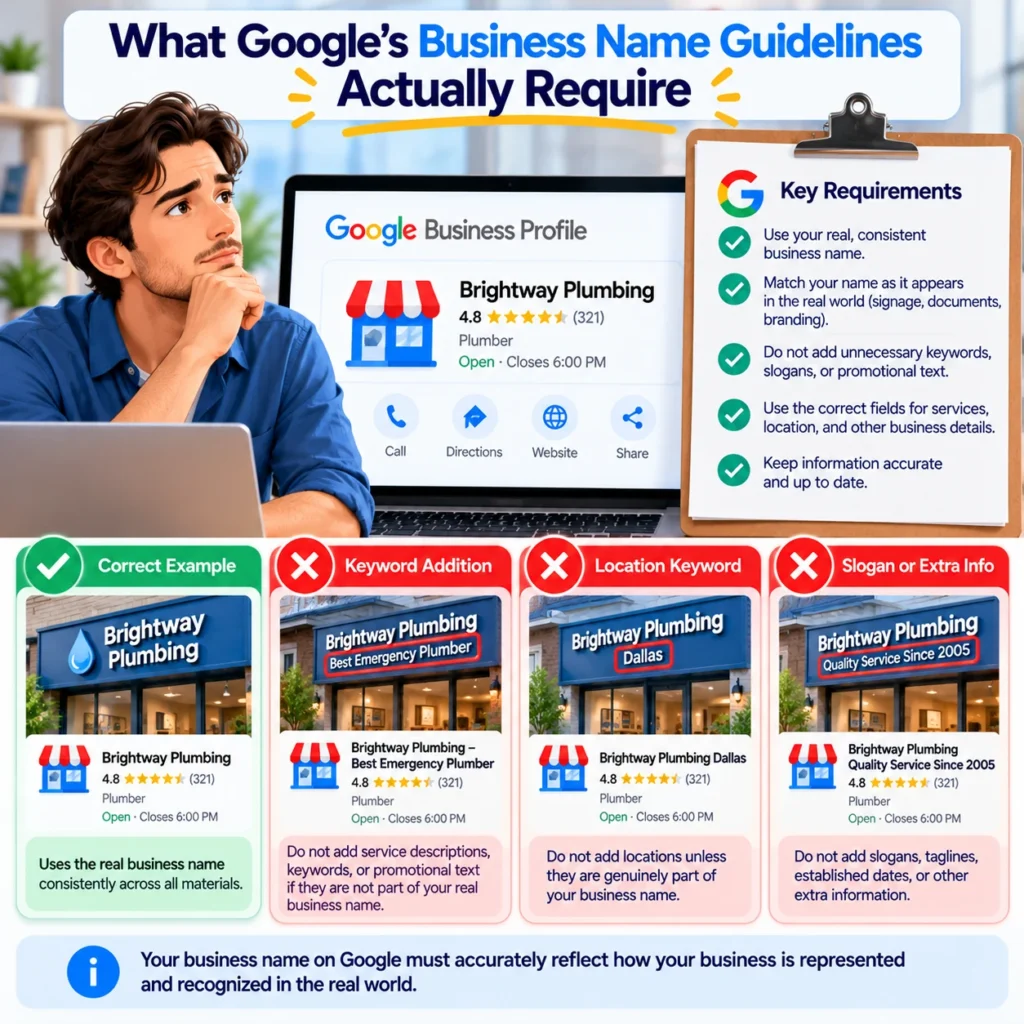
Before trying to reinstate a suspended profile, understand the standard against which your business name should be checked.
Google’s central requirement is that the business name accurately reflect how the business is represented and recognized in the real world. The name should be used consistently across relevant branding and business materials.
The profile’s name field is not intended to hold every detail that might help customers discover the business.
The following examples illustrate the distinction.
| Business situation | Example | Recommended approach |
|---|---|---|
| Genuine rebrand | The business has changed its name from Brightway Plumbing to Brightway Home Services and uses the new name in its real-world branding. | Document the genuine name change and make sure the profile accurately represents the business. |
| Keyword addition | Brightway Plumbing becomes Brightway Plumbing – Best Emergency Plumber. | Remove promotional wording that is not part of the real-world business name. |
| Location keyword addition | Brightway Plumbing becomes Brightway Plumbing Dallas. | Use the location in the appropriate profile fields unless it is genuinely part of the business name. |
| Legal name change | The registered business name has changed following a formal business development. | Gather relevant records and evidence showing the relationship between the former and current names. |
| Minor formatting adjustment | The business changes capitalization or punctuation. | Check the real-world name and applicable naming requirements before deciding whether further action is needed. |
These examples are illustrative, not a guarantee of how Google will decide a particular case.
Special characters, legal terms, and certain formatting choices may require real-world proof that they are consistently part of the business name. Requirements can differ depending on the business structure and circumstances.
For the definitive rules, consult Google’s official Guidelines for Representing Your Business on Google.
What to Do If Your Google Business Profile Is Suspended After Changing the Name
If your profile has already been suspended, focus on understanding the problem and preparing a consistent explanation. The following steps provide a practical framework.
Step 1: Confirm the Status of Your Business Profile
First, sign in to the Google Account associated with the affected Business Profile.
Check whether Google has suspended or disabled the profile, rejected the name edit, or restricted the account managing the profile. These situations are not necessarily identical, and the appropriate resolution process may differ.
Record any suspension notice, email notification, or policy information displayed in your account.
If Google identifies a particular policy concern, use that information as the starting point for your investigation. Do not rely only on the timing of the name change to determine the cause.
Step 2: Review the New Name Against the Real Business Name
Compare the current profile name with the name your business actually uses.
Check the following:
- Is the name used on permanent signage, where applicable?
- Does it match the business’s established branding?
- Have you added a slogan, service description, phone number, website address, or unnecessary keywords?
- Does the name accurately represent the business customers interact with?
- If the business has rebranded, can you explain why the former name changed?
If the updated name contains wording that is not part of the genuine business name, identify the discrepancy before submitting your appeal.
Do not invent evidence or change documents merely to make them appear consistent. Your goal is to demonstrate the business’s actual identity accurately.
Step 3: Review Other Profile Information
Next, examine the rest of the profile for inconsistencies that may need attention.
Review the business address or service area, phone number, website, category, and other information relevant to your business. Consider whether any of these details changed at the same time as the name.
For a business with a physical location, check whether the location and signage accurately represent the business. If you operate as a service-area business, make sure your profile reflects the applicable requirements for that business model.
Do not make a series of speculative edits. Identify specific discrepancies and establish what needs to be corrected.
Step 4: Prepare Evidence Supporting the Business Name
Evidence is especially important when your business has genuinely changed its name.
Depending on your circumstances, useful documents may include:
- Official business registration records.
- A business license.
- Relevant tax certificates.
- Utility bills associated with the business.
- Photographs of permanent business signage.
- Invoices, stationery, or other business materials showing the name in real-world use.
- Documents explaining a formal rebrand or transition from the former name to the current name.
Not every document will be relevant to every business. Select evidence that directly supports your explanation rather than uploading unrelated files.
Check that the business name and address on your documents are consistent with the profile wherever applicable. If some documents still show the former name, provide context that explains the transition when the appeal process allows it.
Google lists official business registration, licenses, tax certificates, and business utility bills among the types of evidence that can support eligible reinstatement appeals.
For a more detailed preparation process, see our guide to Google Business Profile reinstatement evidence.
Step 5: Build a Clear Explanation of the Name Change
Before submitting an appeal, organize the facts into a short, clear explanation.
Your explanation should answer three questions:
- What was the previous business name?
- Why was the name changed?
- How does the current name accurately represent the real business?
For example, a business that has completed a genuine rebrand can explain that the former name was replaced by the current name and identify the supporting records or branding materials.
If the previous edit included wording that was not part of the real-world name, explain the corrective action honestly. Do not claim that a change was legitimate if it was made solely to add promotional keywords.
The objective is to help Google understand the actual circumstances and assess the profile against its guidelines.
Step 6: Submit an Appeal Through Google’s Official Process
Once you have reviewed the relevant guidelines and prepared your evidence, use Google’s official Business Profile appeals process.
Start with Google’s Fix Suspended or Disabled Profiles guidance and follow the instructions provided for your account and profile.
Depending on the available appeal options, you may be asked to select the affected profile, review the decision, explain why reinstatement is appropriate, and attach supporting documentation.
Pay attention to the evidence submission instructions. Google may provide a linked evidence form after you initiate an appeal. Its current instructions specify that, when this form is presented, you must submit the evidence within 60 minutes of opening it for the evidence to be attached.
Prepare your documents before starting so that you can complete the process accurately.
Do not submit repeated appeals for the same issue while a decision is pending. Google’s guidance warns that appeal opportunities can be limited and advises users to review the profile and prepare supporting evidence before submitting.
Step 7: Monitor the Appeal and Follow the Decision
After submitting the appeal, check its status using Google’s appeals tool and watch for email updates.
If the profile is reinstated, verify that the business information accurately reflects the real-world business. Avoid making unnecessary changes immediately afterward.
If the appeal is rejected, read the decision carefully before taking further action. Depending on your eligibility and circumstances, Google may provide an option for an additional review or other available next steps.
Do not assume that submitting another identical appeal will produce a different result. Any further submission should address the actual reason for the decision and include relevant new information where permitted.
What Evidence Is Most Useful After a Genuine Rebrand?
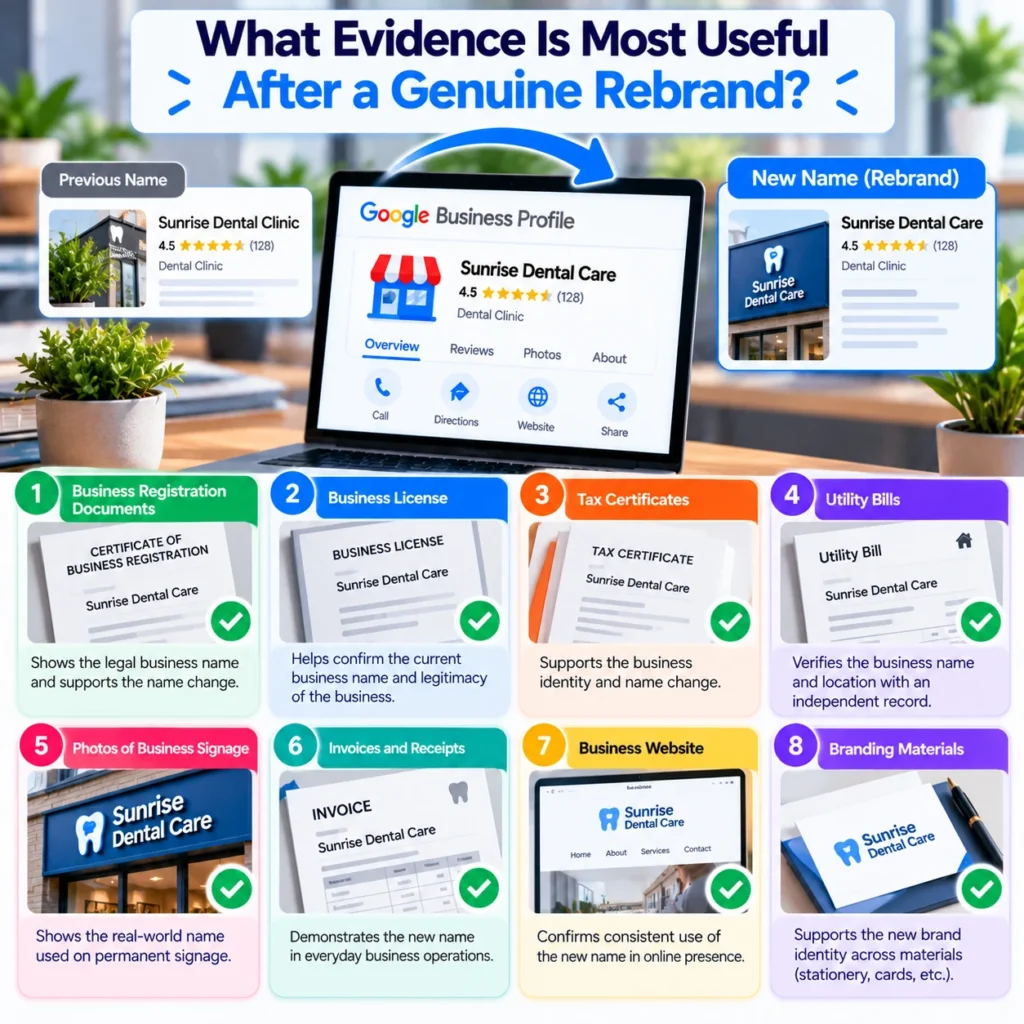
When the suspension follows a legitimate business name change, evidence should establish the relationship between the former identity and the current one.
A document showing the new name can be helpful, but its value depends on the circumstances and whether it supports the explanation you provide.
Business Registration and Licensing Documents
Official registration records or a business license may help establish the current legal identity of the business.
These records are particularly relevant when the company has undergone a formal name change. However, the legal name and the name customers see may not always be identical. Explain the relationship between them rather than assuming that a legal document alone resolves every naming question.
Photographs of Real-World Branding
For businesses with a customer-facing location, photographs of permanent signage can help demonstrate how the business is identified in the real world.
Make sure the photographs are genuine, current, and relevant. A temporary sign created only for an appeal may not accurately demonstrate established business branding.
For service-area businesses, the relevant evidence may differ because they do not necessarily serve customers at a publicly listed storefront.
Invoices, Stationery, and Business Records
Invoices, business stationery, and other genuine materials may help show that the new name is being used consistently.
Choose records that support the facts of your case. If your rebrand is recent and some documents still display the previous name, explain the transition where appropriate.
Utility Bills and Other Supporting Records
Google identifies utility bills associated with the business as one possible type of supporting evidence. Depending on your case, these records may help establish the business’s location and identity.
Check that the details are relevant to the affected profile and that the documents are authentic.
Important: No particular document guarantees reinstatement. Google evaluates the information in the context of the applicable policies and the specific appeal.
Mistakes to Avoid When Appealing a Name-Change Suspension
A rushed response can make a difficult situation more confusing. Avoid the following mistakes.
Repeatedly Changing the Business Name
Do not cycle through different names in an attempt to find one that removes the suspension.
Each edit should have a legitimate business reason and accurately represent the business. Repeated speculative changes can make it harder to establish which name is correct.
Adding Keywords Back Into the Name
If the original issue involved promotional wording or search terms, adding similar wording back into the profile can recreate the same problem.
Keep the business name separate from the services, locations, and other details that belong in their designated fields.
Creating a New Profile to Replace the Suspended One
Do not create a new Business Profile for the same business as a workaround while the suspension is being addressed. Google’s reinstatement guidance specifically warns against creating another profile for the same business.
A duplicate can introduce additional complications instead of resolving the original issue.
Submitting an Appeal Without Reviewing the Guidelines
An appeal that simply states the business is legitimate may not address the actual concern.
Explain the name change, identify relevant corrections, and provide evidence that supports the facts. Before submitting, verify that the profile complies with the applicable guidelines.
Providing Inconsistent or Unrelated Evidence
A large collection of documents is not necessarily better than a smaller set of relevant records.
Avoid submitting unrelated materials or documents that contradict your explanation without context. Review the details carefully and organize the evidence around the specific issue.
Assuming That Timing Proves the Cause
The profile may have been suspended shortly after the name change, but this does not establish exactly why Google took action.
Investigate the available notice, the profile’s recent changes, and the relevant policies before deciding what needs to be addressed.
How to Reduce the Risk of Another Suspension After Reinstatement
Once your Business Profile is restored, keep its information accurate and consistent.
Use the following practices when managing future business name changes.
Maintain consistent real-world branding. Update relevant business materials as appropriate and make sure the profile reflects how the business is genuinely represented.
Use the correct fields. Put services, categories, opening hours, contact details, and service areas in their designated fields rather than adding them to the business name.
Keep records of legitimate changes. Save relevant registration documents, licenses, invoices, signage photographs, and other records that explain a rebrand or business transition.
Make deliberate edits. Review a proposed change before submitting it. Avoid combining unrelated edits merely for convenience.
Check the guidelines before changing the name. If you are uncertain whether a proposed name accurately represents the business, review Google’s official requirements first.
Preserve access to the correct account. Ensure authorized people can access the profile and that business ownership and account permissions are managed appropriately.
These practices cannot guarantee that a profile will never be suspended, but they help maintain accurate business information and make legitimate changes easier to explain if questions arise.
Frequently Asked Questions
Can changing my Google Business Profile name cause a suspension?
Yes. A name change can be associated with a suspension if the updated profile does not comply with Google’s requirements, such as when the name includes unnecessary keywords or does not accurately represent the real-world business. However, a suspension immediately after an edit does not prove that the name change was the sole cause.
Will Google reinstate my profile if I change the name back?
Not necessarily. Returning to a previously used name may correct a naming problem, but it does not guarantee reinstatement. Review the suspension decision, make sure the profile complies with the applicable guidelines, and follow the official appeal process.
Should I remove keywords from my business name before appealing?
If the keywords are not genuinely part of your real-world business name, you should address that issue. Review the profile and the available instructions before making further edits, particularly if the profile is already suspended. Do not make speculative changes without understanding the relevant policy concern.
What documents should I submit for a business name change suspension?
Depending on your circumstances, relevant evidence may include business registration records, a business license, tax certificates, utility bills, photographs of permanent signage, invoices, or other genuine business materials. Choose documents that support the actual name change and follow the instructions provided in Google’s appeals process.
How long does Google take to review a suspension appeal?
Review times vary. Google provides status information through its appeals tool and sends an email with the decision. Check the current instructions and status for your specific appeal rather than relying on a guaranteed turnaround time.
Can I create another Business Profile while the original is suspended?
You should not create a new profile for the same business as a workaround. Google’s official reinstatement guidance warns against creating another Business Profile for the same business. Address the existing profile through the appropriate process.
What if my business name changed legally but my profile was still suspended?
Prepare records that explain the legal name change and demonstrate how the current name represents the business. Check the other profile details for inconsistencies, then follow Google’s official appeal instructions. A legitimate name change is relevant context, but it does not automatically guarantee reinstatement.
What if my appeal is denied?
Review the decision and determine whether Google offers an additional review or another applicable next step. Where permitted, provide relevant evidence or information that was missing from the initial submission. Avoid repeating the same appeal without addressing the reason for the decision.
Need Help With a Google Business Profile Suspension?
If your Google Business Profile was suspended after changing the business name, the first step is to identify whether the updated name, supporting business information, or another profile issue may have contributed to the decision.
A careful review can help you identify inconsistencies, organize relevant evidence, and prepare a more focused response. Every case is different, and no third party can guarantee that Google will reinstate a suspended profile.
If you need assistance reviewing the situation, MapRepute can help assess your Google Business Profile issue and explain the available options based on your circumstances.
